반응형

BeautifulSoup 관련 내용은 다음 Documentation을 참고하였습니다.
https://www.crummy.com/software/BeautifulSoup/bs4/doc/
Beautiful Soup Documentation — Beautiful Soup 4.12.0 documentation
Beautiful Soup Documentation Beautiful Soup is a Python library for pulling data out of HTML and XML files. It works with your favorite parser to provide idiomatic ways of navigating, searching, and modifying the parse tree. It commonly saves programmers h
www.crummy.com
BeautifulSoup
웹 사이트를 크롤링한 후에 HTML 태그로부터 원하는 데이터를 가져오는 python 라이브러리
이 포스팅에서는 임의로 HTML파일을 만들고 실습하겠습니다.
BeautifulSoup 설치하기
- requirements.txt 파일을 폴더에 생성한 후, 다음을 입력합니다.
beautifulsoup4- terminal에서 bash창을 열고 다음 명령어를 입력하면 라이브러리가 설치됩니다. 다른 라이브러리도 이와 같은 방법으로 설치할 수 있습니다.
pip install -r requirements.txt
BeautifulSoup 시작하기
- 작업 폴더 안에 html 폴더를 생성한 후, index.html 파일을 만듭니다.
- 만든 index.html 파일에 다음을 붙여 넣습니다. 물론 각자 자유롭게 변형하여 만들어도 됩니다.
<!DOCTYPE html>
<html>
<head>
    <meta charset="UTF-8">
    <title>BeautifulSoup 연습</title>
</head>
<body>
    <div class="story1">
        <p>즐거운 이야기 1</p>
        <p>즐거운 이야기 2</p>
    </div>
    <div class="story2">
        <p>교훈 이야기 1</p>
        <p>교훈 이야기 2</p>
        <p>교훈 이야기 3</p>
    </div>
</body>
</html>- terminal에 다음 명령어를 입력하여 파일을 만듭니다.
touch ch01.py- ch01.py 파일에 다음 내용을 입력합니다. html파일을 BeautifulSoup 객체로 만드는 과정입니다.
# -*- coding:utf-8 -*-
from bs4 import BeautifulSoup

def main():
    # index.html을 불러와서 BeautifulSoup 객체 초기화
    soup = BeautifulSoup(open("html/index.html", encoding="utf-8"), "html.parser")
    print(soup)

if __name__ == "__main__":
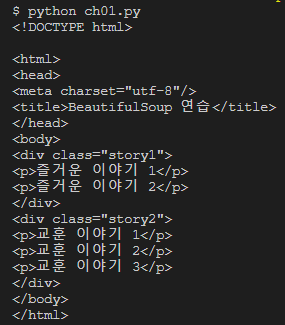
main()- terminal에 python ch01.py를 입력하면 다음이 출력됩니다. 우리가 작성한 html파일을 불러왔습니다.
- type이 뭔지 출력하면 다음처럼 나옵니다.

title
- 이제 메소드별 출력물을 확인하면서 익혀보겠습니다.
- 실행은 항상 terminal에 python ch01.py를 하면 됩니다. 위 방향키(↑)를 누르면 지금까지 자신이 누른 명령어가 불러오니까 편리하게 사용하시면 됩니다.
- main() 아래에 계속 이어서 작성하면 됩니다.
- 출력된 결과는 " >>>"로 표현하겠습니다.
- soup.title
print(soup.title)
>>> <title>BeautifulSoup 연습</title>- soup.title.name
print(soup.title.name)
>>> title- soup.title.string
print(soup.title.string)
>>> BeautifulSoup 연습- soup.p : 첫번째 <p>태그만 출력이 됩니다. 여러 개 혹은 선택적 출력은 아래(find)에서 다루겠습니다.
print(soup.p)
>>> <p>즐거운 이야기 1</p>- soup.get_text()
print(soup.get_text())
>>>
BeautifulSoup 연습


즐거운 이야기 1
즐거운 이야기 2


교훈 이야기 1
교훈 이야기 2
교훈 이야기 3
find()
- soup.find() : 내가 원하는 태그를 가져올 수 있습니다.
print(soup.find("title"))
>>> <title>BeautifulSoup 연습</title>

print(soup.find("p"))	# 동일한 태그가 여러 개 있을 경우 첫 번째 것을 출력
>>> <p>즐거운 이야기 1</p>

print(soup.find_all("p"))
>>> [<p>즐거운 이야기 1</p>, <p>즐거운 이야기 2</p>, <p>교훈 이야기 1</p>, <p>교훈 이야
기 2</p>, <p>교훈 이야기 3</p>]- '교훈 이야기 2' 만 불러올 수 없을까요? story2의 <p> 태그를 모두 불러와봅니다.
story2_str = soup.find('div', class_ = "story2")
print(story2_str)
>>>
<div class="story2">
<p>교훈 이야기 1</p>
<p>교훈 이야기 2</p>
<p>교훈 이야기 3</p>
</div>- 여기에서 두 번째 <p>태그, 인덱스 1번의 <p> 태그를 불러옵니다.
story2_str = soup.find('div', class_ = "story2").find_all('p')
print(story2_str[1].get_text())
>>> 교훈 이야기 2- 성공 :)
'Python > Crawling' 카테고리의 다른 글
| [Crawling]_서울열린데이터광장에서 API로 데이터 수집하기 (0) | 2023.08.15 |
|---|---|
| [Crawling]_Selenium 설치 확인하기 (0) | 2023.08.10 |
| [Crawling]_API를 이용하여 웹에서 정보 가져오기 (0) | 2023.08.07 |
| [Crawling]_뉴스 타이틀만 가져올 수 있을까? (0) | 2023.08.06 |
| [Crawling]_웹 페이지의 데이터를 가지고 올 수 있을까? (0) | 2023.08.04 |


